



Skillshare: Online Classes App
16+
downloads5.0+
version Android
Added: Denis Rubinov
Version: 5.4.79
Size: 22.9 MB
Updated: 24.06.2025
Developer: Skillshare, Inc
Age Limitations: Everyone
Authorizations: 11
Downloaded on Google Play: 3925103
Category: Education
Description
Application Skillshare: Online Classes App was checked by VirusTotal antivirus. As a result of the scan, no file infections were detected by all the latest signatures.
How to install Skillshare: Online Classes App
- Download APK file apps from apkshki.com.
- Locate the downloaded file. You can find it in the system tray or in the 'Download' folder using any file manager.
- If the file downloaded in .bin extension (WebView bug on Android 11), rename it to .apk using any file manager or try downloading the file with another browser like Chrome.
- Start the installation. Click on the downloaded file to start the installation
- Allow installation from unknown sources. If you are installing for the first time Skillshare: Online Classes App not from Google Play, go to your device's security settings and allow installation from unknown sources.
- Bypass Google Play protection. If Google Play protection blocks installation of the file, tap 'More Info' → 'Install anyway' → 'OK' to continue..
- Complete the installation: Follow the installer's instructions to complete the installation process.
How to update Skillshare: Online Classes App
- Download the new version apps from apkshki.com.
- Locate the downloaded file and click on it to start the installation.
- Install over the old version. There is no need to uninstall the previous version.
- Avoid signature conflicts. If the previous version was not downloaded from apkshki.com, the message 'Application not installed' may appear. In this case uninstall the old version and install the new one.
- Restart annex Skillshare: Online Classes App after the update.








Requesting an application update
Added Denis Rubinov
Version: 5.4.79
Size: 22.9 MB
Updated: 24.06.2025
Developer: Skillshare, Inc
Age Limitations: Everyone
Authorizations:
Downloaded on Google Play: 3925103
Category: Education












Reviews for Skillshare: Online Classes App
If I could do 0 stars I would. Seriously, Why even offer refunds if you never actually go through with refunding? I'm nearly broke because of this service... A service I no longer use. Haven't used in over a year and would recommend nobody starting. Even if you look to cancel, they will find a way to charge you.
This App is very helpful and helps us to learn so many things
Great experience. I'm gaining a practical knowledge and learning a lot of useful skills.
Don't download this app if you are looking for free resources
Great app
Good
Love it
Freaking love this app, learning all kinds of random stuff just because lol. Like if I wanted to use illustrator I can.... now 😂
Love skillshare but I've tried logging in for the past few days on mobile and each time it says "sorry, we are unable to complete that request" when I hit the login button. I've tried everything, reinstalling, clearing app cache, waiting days. Frustrating because I was planning to take the courses on a long flight.
This app is super scammy. If you do choose to use this please ensure that when you cancel with skillshare you also cancel with your PayPal or second vendor account. When you cancel your skillshare account it will not cancel your automatic payment with PayPal. Per their refund policy you will not know until it is too late. Their customer service for resolving this problem this is terrible.
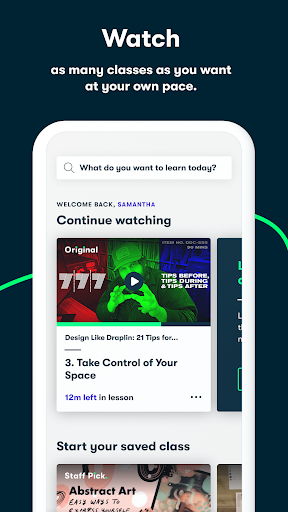
disappointed in the app and the company. great concept, sub-par delivery. the classes aren't dated, so you have no idea what's still relevant. limited sorting and filtering. very big range in quality of teaching. opened the app today and it didn't resume or show any indication of where i left off. the ability to increase/decrease the playback speed has also disappeared. i definitely won't be renewing with this company.
I'm sorry to say, the UX of the android app is pretty bad. For example, after poking about quite a lot, I was unable to even change my profile picture. On the contrary, their website, even on a mobile browser is MUCH more usable. Here is an examples of my frustrations: - To browse by category, the user needs to scroll all the way to the bottom and then click on a dropdown menu. On the other hand a simple hamburger menu with categories would easily make the app much more usable.
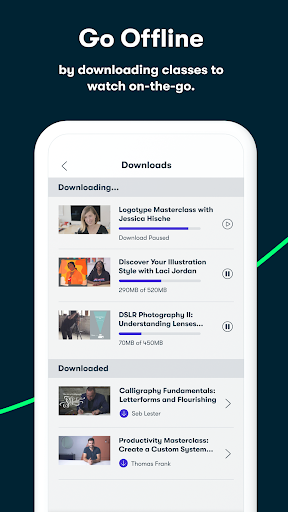
at first the app didnt recognize that my account was premium. I had set the skillshare account up on my laptop and wanted it on my phone when I'm not home. It had my account on premium but all the content was locked. I had to uninstall and reinstall for it to work but now it's great. I like the download feature because it's useful on airplanes and subways. I like that you can play at different speeds too which is great if someone talks very slow or rambles on before they get to the point.
As a mom with limited time this was the perfect app for me!!! I wanted to learn different kinds of creative techniques and you can find it all, I usually watch it while my baby naps. The only thing I don't love about it, and actually hate, is how you cannot organize the classes trough your phone or tablet, they depend a lot on computers and that doesn't fit my life style, that is making me want to explore other learning apps, to see if one of them would offer a better interface...
I'd be happier with it if I could do split screen, but every time I try it pauses as soon as I touch the other screen. Kind of pointless for it to let me even open it in split screen just to not play the video/ lesson. I get that they want you to learn from the lessons, but there are Somme that you're better off just listening to as you search for whatever creative thing is in your mind.
Post a comment
To leave a comment, log in with your social network:
Or leave an anonymous comment. Your comment will be sent for moderation.
Post a comment
To leave a comment, log in with your social network:
Or leave an anonymous comment. Your comment will be sent for moderation.