



Moves +
7+
downloads4.1+
version Android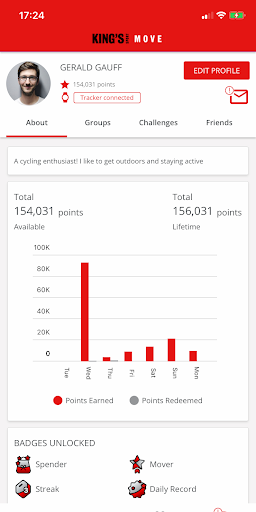
Added: Denis Rubinov
Version: 5.3.1
Size: 76.4 MB
Updated: 24.06.2025
Developer: OpenPlay
Age Limitations: Everyone
Authorizations: 9
Downloaded on Google Play: 50024
Category: Health & Fitness
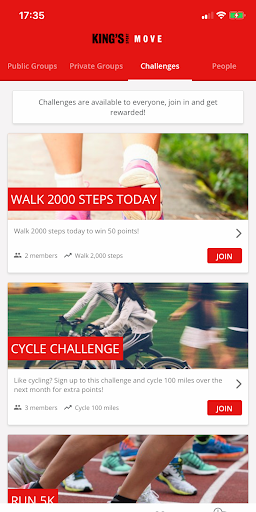
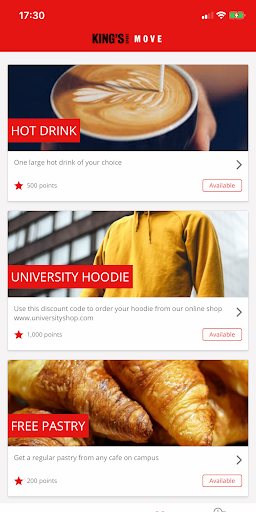
- Having challenges and useful rewards ..
- Creation of thematic communities.
- Compatible with some of the most popular fitness trackers.
- Visual display of statistics.
- Simple and intuitive interface.
- Can work in the background.
Description
Application Moves + was checked by VirusTotal antivirus. As a result of the scan, no file infections were detected by all the latest signatures.
How to install Moves +
- Download APK file apps from apkshki.com.
- Locate the downloaded file. You can find it in the system tray or in the 'Download' folder using any file manager.
- If the file downloaded in .bin extension (WebView bug on Android 11), rename it to .apk using any file manager or try downloading the file with another browser like Chrome.
- Start the installation. Click on the downloaded file to start the installation
- Allow installation from unknown sources. If you are installing for the first time Moves + not from Google Play, go to your device's security settings and allow installation from unknown sources.
- Bypass Google Play protection. If Google Play protection blocks installation of the file, tap 'More Info' → 'Install anyway' → 'OK' to continue..
- Complete the installation: Follow the installer's instructions to complete the installation process.
How to update Moves +
- Download the new version apps from apkshki.com.
- Locate the downloaded file and click on it to start the installation.
- Install over the old version. There is no need to uninstall the previous version.
- Avoid signature conflicts. If the previous version was not downloaded from apkshki.com, the message 'Application not installed' may appear. In this case uninstall the old version and install the new one.
- Restart annex Moves + after the update.





Requesting an application update
Added Denis Rubinov
Version: 5.3.1
Size: 76.4 MB
Updated: 24.06.2025
Developer: OpenPlay
Age Limitations: Everyone
Authorizations:
Downloaded on Google Play: 50024
Category: Health & Fitness












Reviews for Moves +
Still not able to connect the Moves app to Google fit, but latest update includes sync via Strava. This is (fingers crossed - it's only been a couple of days so far!) working fine for me! Thanks to all the team for this big update.
The app says I have earned over 5,000 points and I have spent 1,500. All this is true, however it now is showing that I only have 108 points to spend, so I can't redeem any more of the 3,500 points I have already earned?? Also the data sync is very inaccurate... There are some days where I have recorded 15,000+ steps on my fitbit, yet only half or less come up on moves. It is very inconsistent whether it will sync properly or not.
If you're relying on syncing this app with Google Fit on Android phone, it doesn't work. Either it doesn't sync at all, or only partially syncs, leaving a big discrepancy between steps recorded in Google Fit, and those showing in Moves.
I cannot check "My progress" under challenges. The screen goes blank and I have to force shut the app and open it again to use it. Also had to try to connect Google Fit for days before it finally synced up with the app.
I wish it was more user friendly and there was a way to look at the daily steps achieved! The FAQs state that the steps are synced automatically but there isn't a way to confirm this, or a way to manually refresh.
New update fixed all the issues I was having. Works really well and is very compatabile with strava/Google fit. Manual sync is really helpful and the activity log let's you double check all your points and track everything.
Poor - doesn't sync with Google fit
I keep disconnecting and reconnecting both Fitbit and google fit as the preferred tracker every few days as nothing is syncing. I've spent more time trying to sync data then actually using the app.
It does work anymore. 'The moves app has stopped working' is the only message I have received when trying to start it. I have tried to reinstall, but this has not helped. Disappointing.
Terrible app, doesn't sync
Post a comment
To leave a comment, log in with your social network:
Or leave an anonymous comment. Your comment will be sent for moderation.
Post a comment
To leave a comment, log in with your social network:
Or leave an anonymous comment. Your comment will be sent for moderation.