



D-Link Wi-Fi
5+
downloads4.3+
version Android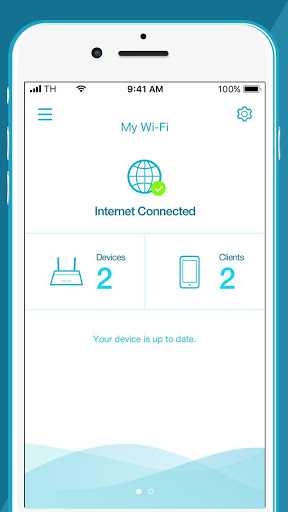
Added: Denis Rubinov
Version: 1.4.8
Size: 52.7 MB
Updated: 24.06.2025
Developer: D-Link Corporation
Age Limitations: Everyone
Authorizations: 12
Downloaded on Google Play: 2411962
Category: Work
Description
Application D-Link Wi-Fi was checked by VirusTotal antivirus. As a result of the scan, no file infections were detected by all the latest signatures.
How to install D-Link Wi-Fi
- Download APK file apps from apkshki.com.
- Locate the downloaded file. You can find it in the system tray or in the 'Download' folder using any file manager.
- If the file downloaded in .bin extension (WebView bug on Android 11), rename it to .apk using any file manager or try downloading the file with another browser like Chrome.
- Start the installation. Click on the downloaded file to start the installation
- Allow installation from unknown sources. If you are installing for the first time D-Link Wi-Fi not from Google Play, go to your device's security settings and allow installation from unknown sources.
- Bypass Google Play protection. If Google Play protection blocks installation of the file, tap 'More Info' → 'Install anyway' → 'OK' to continue..
- Complete the installation: Follow the installer's instructions to complete the installation process.
How to update D-Link Wi-Fi
- Download the new version apps from apkshki.com.
- Locate the downloaded file and click on it to start the installation.
- Install over the old version. There is no need to uninstall the previous version.
- Avoid signature conflicts. If the previous version was not downloaded from apkshki.com, the message 'Application not installed' may appear. In this case uninstall the old version and install the new one.
- Restart annex D-Link Wi-Fi after the update.


Requesting an application update
Added Denis Rubinov
Version: 1.4.8
Size: 52.7 MB
Updated: 24.06.2025
Developer: D-Link Corporation
Age Limitations: Everyone
Authorizations:
Downloaded on Google Play: 2411962
Category: Work












Reviews for D-Link Wi-Fi
D-Link's App is FAR behubd their competitors (Netgear, Tp-Link and Linksys)!!! They're the only app that cannot remotely manage the router! Instead you need to use a web browser and on mobile that looks and works horribly! Also their parental controls are buggy and very limited in features. Too bad because otherwise the actual router is fairly stable and easy to set up. The app itself needs a complete overhaul though.
This apps simply don't work for set up. Tried various sequence and options and numerous reset yet can set up but no internet connection. Installation guide also quite confusing. Good thing tech support was able to provide a quick resolution. Was advised to install using web version instead and had to select "other" for ISP instead of singtel. Good product but can forget about apps for setup and installation guide could be much better.
This was alot easier than setting up my last router. Almost seemless, however, I purchased an open box unit which had been previously installed (and returned). So the router needed to be reset to factory settings to be detected by the app. But this step wasn't documented anywhere. Fortunately I got through very quickly to D-Link phone support and got it sorted out . The rest went smoothly without a lot of tech jargon to figure out.
The installation does not tell you to turn off your mobile data to start install. Instead when you are almost done (10 minutes later), it tells you it cannot install unless you turn off your mobile data. Then it starts the installation all over again!! Install has several other restart glitches like powering on and off each device until you get the sequence EXACTLY right, then it works. Then when you do an update, it does it all over again! This should all be in the background seamless installed
I'm an experienced IT professional, and setup was painful and error-prone. It's working now, so it's not hardware or even interference. Too many manual steps with hard-coded passwords (you have a 2D barcode specific to my unit? Why can't YOU type it in? And why force me to wait several minutes for the "system is starting up"? You can tell it's up, don't force me to wait, then time out, then have to restart from step 1. Sheesh! Very frustrating.
A lot easier than I thought! Works great! Very happy with this purchase. Update: from 5 stars to 3 Inicial setup was very easy. Changing password was quite an hassle! Took me 30 to 45 minutes to put it to work again.... Couldn't find how to change password on device with the app, had to reset and do the whole process again, which only worked around the third or fourth time!
It's been a couple of years and the signal strength is excellent. Although for reasons unknown, the router is persistent in dropping out google cast. The only way to get a them back up and operating is to reboot the modem every time you come back into range. This could happen three times a day. It's very time consuming. It should be noted I have acsess to other goolge homes and don't have any problems.. Just this modem?
Main issue, when you first launch this app to configure your new hardware the app brings up a message to disable your mobile data network. Airplane mode does not fix this error and the only way I found to get around the issue is to eject the phone SIM. Once the SIM was removed the application worked as per the instructions and the rest of the setup was very well communicated in the app. Why is turning off the mobile data a requirement for configuring a router? This was very frustrating.
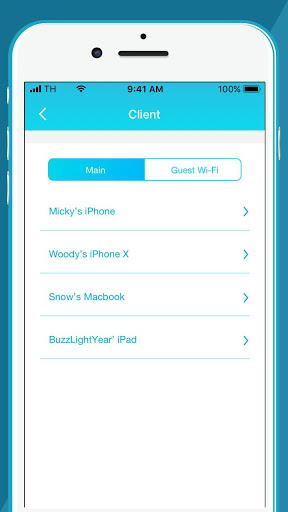
Absolutely love the app. It made setting up my router so simple. It shows everything from how to plug everything in, setting up new router name & password, updating the router and letting me know that its connected and completely done. After initial setup it tells you the connection is working and how many devices are connected to it and what the devices are. Highly recommend using this app.
Post a comment
To leave a comment, log in with your social network:
Or leave an anonymous comment. Your comment will be sent for moderation.
Post a comment
To leave a comment, log in with your social network:
Or leave an anonymous comment. Your comment will be sent for moderation.