


Skinseed for Minecraft
33+
downloads4.2+
version Android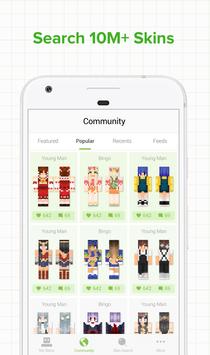

Added: Denis Rubinov
Version: 6.5.7
Size: 22.8 MB
Updated: 06.08.2022
Developer: Africa Sunrise
Age Limitations: Everyone
Authorizations: 10
Downloaded on Google Play: 8569755
Category: Entertainment
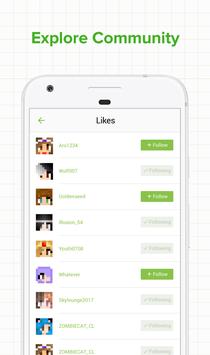
- Access to over 2 million skins.
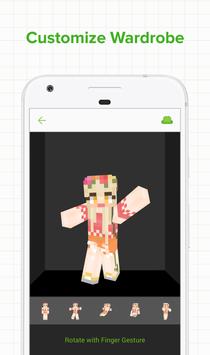
- Quick export of skins to Minecraft.
- All content is available for free.
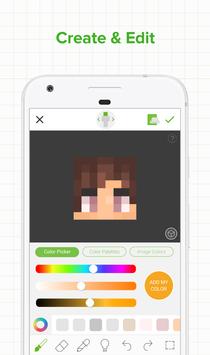
- Create your own skins and publish them to the community.
- Commenting on skins from other users.
- Saving the skins that you like in your personal list.
Description
Application Skinseed for Minecraft was checked by VirusTotal antivirus. As a result of the scan, no file infections were detected by all the latest signatures.
How to install Skinseed for Minecraft
- Download APK file apps from apkshki.com.
- Locate the downloaded file. You can find it in the system tray or in the 'Download' folder using any file manager.
- If the file downloaded in .bin extension (WebView bug on Android 11), rename it to .apk using any file manager or try downloading the file with another browser like Chrome.
- Start the installation. Click on the downloaded file to start the installation
- Allow installation from unknown sources. If you are installing for the first time Skinseed for Minecraft not from Google Play, go to your device's security settings and allow installation from unknown sources.
- Bypass Google Play protection. If Google Play protection blocks installation of the file, tap 'More Info' → 'Install anyway' → 'OK' to continue..
- Complete the installation: Follow the installer's instructions to complete the installation process.
How to update Skinseed for Minecraft
- Download the new version apps from apkshki.com.
- Locate the downloaded file and click on it to start the installation.
- Install over the old version. There is no need to uninstall the previous version.
- Avoid signature conflicts. If the previous version was not downloaded from apkshki.com, the message 'Application not installed' may appear. In this case uninstall the old version and install the new one.
- Restart annex Skinseed for Minecraft after the update.

Doodle | Magic Joy
Entertainment

Google Play Games
Entertainment

Block Master for Minecraft PE
Entertainment
furniture mod
Entertainment
Building Mods for Minecraft
Entertainment
Painting Pixels by Numbers
Entertainment

Peers.TV: телевизор ОНЛАЙН ТВ
Entertainment

ZEPETO: Avatar, Connect & Play
Entertainment
Requesting an application update
Added Denis Rubinov
Version: 6.5.7
Size: 22.8 MB
Updated: 06.08.2022
Developer: Africa Sunrise
Age Limitations: Everyone
Authorizations:
Downloaded on Google Play: 8569755
Category: Entertainment












Reviews for Skinseed for Minecraft
It's great for making skins, easy to use, and has a wide variety of skins to download, but there is one problem, the community. The type of people who use this app are often either extremely inappropriate or annoying, or are just trying to get attention. It also has an issue with art theft, where someone will download a skin and repost it and try to take full credit for it. But don't get me wrong, it is still a great app.
Okay, I've had a bunch of problems before, but this is the biggest yet. So, it kept freezing when id open the app, or just straight up not loading anything online. So, I cleared the data ,didn't realize that'd reset everything...) deleted it, closed it, made it sleep. And NOW, it kicks me out of the app when I try to open it. I straight up can't use it anymore. I swear, fix this.
The amount of bugs are insane. I can get on and get into 1 skin, then when I'm done and try to go back to the home screen, I get stuck on a black screen and I have to restart the app to continue and it will not stop. Please fix this!! I used to use this app and it was great, but now it's hard to use and nearly impossible to navigate through without it bugging out.
Works really well for me, and I use it for everything and all of my skin making. However, starting a skin and finishing one is discouraging since it takes way too much time. It'd be nice if there were 2 new options for skin making: "Fill" and "Fill All" Obviously, "Fill All" will fill the targeted surface of the skin, whether there are color differences or not. "Fill" will just fill the targeted surface, and if there are color differences, it will only change one color. Please make this happen.
First of all great skins, great for creating your own skins. But, for some odd reason when I exported it it didn't show up? I was unsure, so I updated Minecraft. When that finished, I reset my phone and when back. Exported it again a few times and yup. Same result. I used a base for my skin and made my way up to a great looking skin. But, I can't use it. As the files for it just won't show up. I had an old skinseed file with one in it and tried to put my new on in but nope. It Disappears too.
Overall, skinseed is a rather fun, interactive app. Though there are a bunch of great features, there tends to be lots of frequent glitches, bugs, and things that just don't seem to work. First of all, searching for skins and creators is very difficult now. Second of all, the undo and redo buttons don't work unless you place another block of color (something like that), which is simply unconvenient. And last of all, one of the most annoying things is that I can no longer change my pfp with ssm
Post a comment
To leave a comment, log in with your social network:
Or leave an anonymous comment. Your comment will be sent for moderation.
Post a comment
To leave a comment, log in with your social network:
Or leave an anonymous comment. Your comment will be sent for moderation.