



Razer Cortex Games: Rewards
40+
downloads7.1+
version Android
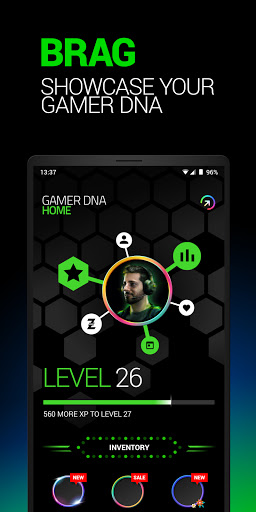

Added: Denis Rubinov
Version: 7.8.3684
Size: 34.6 MB
Updated: 25.02.2023
Developer: Razer Inc.
Age Limitations: Everyone
Authorizations: 20
Downloaded on Google Play: 4716867
Category: Entertainment
Description
Application Razer Cortex Games: Rewards was checked by VirusTotal antivirus. As a result of the scan, no file infections were detected by all the latest signatures.
How to install Razer Cortex Games: Rewards
- Download APK file apps from apkshki.com.
- Locate the downloaded file. You can find it in the system tray or in the 'Download' folder using any file manager.
- If the file downloaded in .bin extension (WebView bug on Android 11), rename it to .apk using any file manager or try downloading the file with another browser like Chrome.
- Start the installation. Click on the downloaded file to start the installation
- Allow installation from unknown sources. If you are installing for the first time Razer Cortex Games: Rewards not from Google Play, go to your device's security settings and allow installation from unknown sources.
- Bypass Google Play protection. If Google Play protection blocks installation of the file, tap 'More Info' → 'Install anyway' → 'OK' to continue..
- Complete the installation: Follow the installer's instructions to complete the installation process.
How to update Razer Cortex Games: Rewards
- Download the new version apps from apkshki.com.
- Locate the downloaded file and click on it to start the installation.
- Install over the old version. There is no need to uninstall the previous version.
- Avoid signature conflicts. If the previous version was not downloaded from apkshki.com, the message 'Application not installed' may appear. In this case uninstall the old version and install the new one.
- Restart annex Razer Cortex Games: Rewards after the update.







Requesting an application update
Added Denis Rubinov
Version: 7.8.3684
Size: 34.6 MB
Updated: 25.02.2023
Developer: Razer Inc.
Age Limitations: Everyone
Authorizations:
Downloaded on Google Play: 4716867
Category: Entertainment












Reviews for Razer Cortex Games: Rewards
Hhkkooo
Don't trust Razer Gold Support Service, all they do is scamming people off their money asking them to bring their damaged or Over scratch cards and in few days later they will tell you that you've use that same card, how possible? How did I used damaged cards? They load it and tell you to call the police. Beware of Razer Gold card they are scammers. You guys still want me to mail u and then ask me for another damaged card, then say I've used it already. That's how bad or worst ur services are
There are zero games I'm a fan of unfortunately
Op
good app
Why auyomaticllally force ingame overlay? I am annoying with in game overlay, trying to find way to close one and just realize that this app updating and automatically add ingame overlay for me. Why forcing? I dont get it.
Nsi
good gamebooster app for android
very god app for games
Bro nice booster
Literally love razer but this cortex program both on PC and mobile is so scam filled. It's hurting the brand imo this app is like the entire '90s Internet in one app. It's also impossible to play enough games to get anything Like mathematically you can't earn z silver to actually buy anything with the way it's expires, I did the math it would take 500 days to buy a headset but z silver expires after a year......
There's a lot more room for improvement. Features I'd like to see are; having extra control over games like app sound/mutes, and uninstalling/storage location, game genre-specific achievements would be more valuable than constantly having limited time events, for example RPG achievements. Also add 1 paid to play silver reward for a game from your own library. That way it encourages us to play SOMETHING we already have 😂 and PLEASE get rid of the cards popup at launch, it's annoying af
excellent way to earn free razer gear and try new games. comes with optimization settings for better gaming also. only thing I would like them to change is the reward amounts for some things. or if they would lower coin price for gear.
I can't view the name of what I'm trying to redeem points for. Most of the rewards you can tell by looking at the image, but others have only an image of what looks to be a box with the Razer logo on it? If you select a reward, it only shows the option to redeem your points. This is kind of a long tangent about a minute thing, but tldr; I just want to know what I'm redeeming my points for before I (or someone else) accidentally spends their points on something they didn't mean to.
When I open the cortex games on android emulator, an error stating "kotlinx.datetime.a" was popped up and I couldn't do anything about it. This didn't occur in the past
Post a comment
To leave a comment, log in with your social network:
Or leave an anonymous comment. Your comment will be sent for moderation.
Post a comment
To leave a comment, log in with your social network:
Or leave an anonymous comment. Your comment will be sent for moderation.