




Added: Denis Rubinov
Version: 2.46
Size: 5.4 MB
Updated: 20.05.2025
Developer: Aleksandr Radionov
Age Limitations: Everyone
Downloaded on Google Play: 11872995
Category: Tools
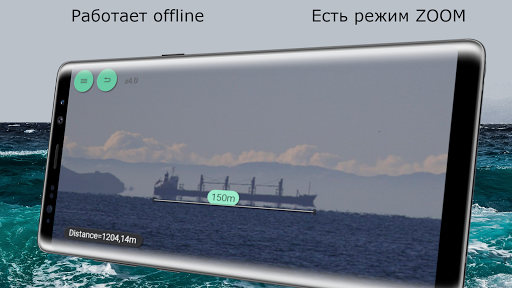
- User-friendly interface.
- There is a zoom function.
- Can be calibrated.
- Works on smartphones and tablets.
- Internet access is not required.
Description
Application distance was checked by VirusTotal antivirus. As a result of the scan, no file infections were detected by all the latest signatures.
How to install distance
- Download APK file apps from apkshki.com.
- Locate the downloaded file. You can find it in the system tray or in the 'Download' folder using any file manager.
- If the file downloaded in .bin extension (WebView bug on Android 11), rename it to .apk using any file manager or try downloading the file with another browser like Chrome.
- Start the installation. Click on the downloaded file to start the installation
- Allow installation from unknown sources. If you are installing for the first time distance not from Google Play, go to your device's security settings and allow installation from unknown sources.
- Bypass Google Play protection. If Google Play protection blocks installation of the file, tap 'More Info' → 'Install anyway' → 'OK' to continue..
- Complete the installation: Follow the installer's instructions to complete the installation process.
How to update distance
- Download the new version apps from apkshki.com.
- Locate the downloaded file and click on it to start the installation.
- Install over the old version. There is no need to uninstall the previous version.
- Avoid signature conflicts. If the previous version was not downloaded from apkshki.com, the message 'Application not installed' may appear. In this case uninstall the old version and install the new one.
- Restart annex distance after the update.








Requesting an application update
Added Denis Rubinov
Version: 2.46
Size: 5.4 MB
Updated: 20.05.2025
Developer: Aleksandr Radionov
Age Limitations: Everyone
Downloaded on Google Play: 11872995
Category: Tools











Reviews for distance
The calibration VDO isn't the real as calibration screen of my phone. I can't calibrate it till I give up.
Difficult to calibrate. Even the video doesn't help
It is not user friendly and not accurate application.
Totally useless and cheap application don't waste your time and data.
Good for quick measurement taking and professionals.
Maybe it works but there should be some kind of guide to assist as I cant use it..shame
It's not accurate at all. I tried many times. Useless garbage
does me no good, only measures in metrics, or I'm just not smart enough to get inches
Wasn't work, useless, and I suggest no need to download and install it Regards Costumer
Totally useless and incomplete app that does NOT work as advertised (not even after so called calibration)
Post a comment
To leave a comment, log in with your social network:
Or leave an anonymous comment. Your comment will be sent for moderation.
Post a comment
To leave a comment, log in with your social network:
Or leave an anonymous comment. Your comment will be sent for moderation.