


Fake GPS Location: Joystick an
29+
downloads4.2+
version Android

Added: Denis Rubinov
Version: 5.9.4
Size: 6.3 MB
Updated: 16.12.2021
Developer: dgsmartstudio
Age Limitations: Everyone
Authorizations: 10
Downloaded on Google Play: 7824264
Category: Tools
Description
Application Fake GPS Location: Joystick an was checked by VirusTotal antivirus. As a result of the scan, no file infections were detected by all the latest signatures.
How to install Fake GPS Location: Joystick an
- Download APK file apps from apkshki.com.
- Locate the downloaded file. You can find it in the system tray or in the 'Download' folder using any file manager.
- If the file downloaded in .bin extension (WebView bug on Android 11), rename it to .apk using any file manager or try downloading the file with another browser like Chrome.
- Start the installation. Click on the downloaded file to start the installation
- Allow installation from unknown sources. If you are installing for the first time Fake GPS Location: Joystick an not from Google Play, go to your device's security settings and allow installation from unknown sources.
- Bypass Google Play protection. If Google Play protection blocks installation of the file, tap 'More Info' → 'Install anyway' → 'OK' to continue..
- Complete the installation: Follow the installer's instructions to complete the installation process.
How to update Fake GPS Location: Joystick an
- Download the new version apps from apkshki.com.
- Locate the downloaded file and click on it to start the installation.
- Install over the old version. There is no need to uninstall the previous version.
- Avoid signature conflicts. If the previous version was not downloaded from apkshki.com, the message 'Application not installed' may appear. In this case uninstall the old version and install the new one.
- Restart annex Fake GPS Location: Joystick an after the update.

Star Chart
Education

Дурак на раздевание
Board games

Card Game Durak - Rules and Tips
Books and Reference

Durak - Rules of Card Games
Books and Reference

Карточная игра дурак на раздевание - Правила игры
Books and Reference

World Travel Guide by Triposo
Travels

izi.TRAVEL: Get a Travel Guide
Travels

Magic: The Gathering Arena
Board games
Requesting an application update
Added Denis Rubinov
Version: 5.9.4
Size: 6.3 MB
Updated: 16.12.2021
Developer: dgsmartstudio
Age Limitations: Everyone
Authorizations:
Downloaded on Google Play: 7824264
Category: Tools












Reviews for Fake GPS Location: Joystick an
After finally figuring out how to get this to work I am unable to use this for pokemon go, does this app just not work for that game? I appear to have everything set up right but the game is saying it faild to detect location.
Looks like it work, but can not maintain the new set location because always be override by the gps location resulting location to jumping back and forth between both location repeatedly.
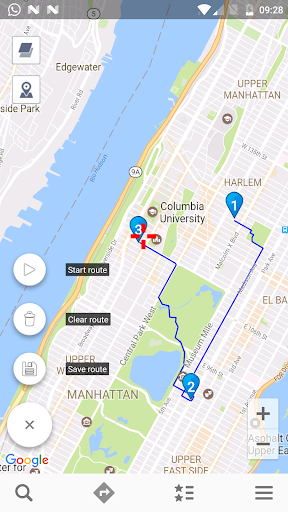
root mode available, ads not intrusive, ui feels lacking, starting route will jump you to target location with no option to change it, no "walk to target".. overall the app is working fine if you know how to use it properly, but it is still lack many function..
Before I totally love this app, I can go anywhere and play pokemon, I would like to give 10 stars if I can, but now I'm a little feel down because when I upgrade the phone, this app no longer work well, it keep jump back to the real location, please fix it.
Useless app. When I set my fake location, it will jump twice a second between my actual location and the one I set. I read the FAQs online, and it mentioned this problem, but it didn't give any solutions
the app seems to be just drawing a straight line when creating a route, rather than following the roads/pathways on the map. I'm running in expert mode as a system app
For some reason the route's don't work, everytime I set 2 points it just goes in a straight line towards the other point, even if I put multiple points, completely disregarding stuff like rivers, roads, buildings, etc.
Beautiful, clean and light. gets the job done smoothly. Could be a real FGL PRO killer but just lacks one last key feature: the ability to modify cardinal point geadings for joystick. Currently only good for going northwards.
Sadly just white screens after ten seconds. Upon closer inspection into the apps files i found a string of DMG code that is causing it the white screen.
doesn't work with root mode. The app already moved to system/priv-app and disabled the mock location. But the popup still showing "No need to enable mock location, etc".
Post a comment
To leave a comment, log in with your social network:
Or leave an anonymous comment. Your comment will be sent for moderation.
Post a comment
To leave a comment, log in with your social network:
Or leave an anonymous comment. Your comment will be sent for moderation.