


BubbleUPnP for DLNA/Chromecast
37+
downloads1.0+
version Android

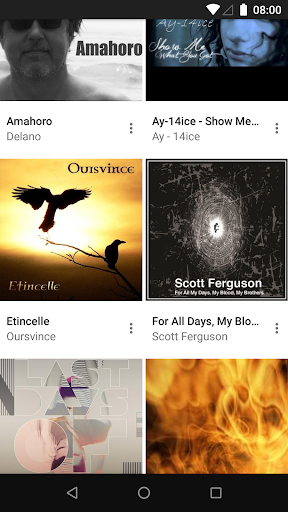
Added: Denis Rubinov
Version: 4.3.3
Size: 21.7 MB
Updated: 03.02.2024
Developer: Bubblesoft
Age Limitations: Everyone
Authorizations: 15
Downloaded on Google Play: 11242099
Category: Video Players & Editors
Description
Application BubbleUPnP for DLNA/Chromecast was checked by VirusTotal antivirus. As a result of the scan, no file infections were detected by all the latest signatures.
How to install BubbleUPnP for DLNA/Chromecast
- Download APK file apps from apkshki.com.
- Locate the downloaded file. You can find it in the system tray or in the 'Download' folder using any file manager.
- If the file downloaded in .bin extension (WebView bug on Android 11), rename it to .apk using any file manager or try downloading the file with another browser like Chrome.
- Start the installation. Click on the downloaded file to start the installation
- Allow installation from unknown sources. If you are installing for the first time BubbleUPnP for DLNA/Chromecast not from Google Play, go to your device's security settings and allow installation from unknown sources.
- Bypass Google Play protection. If Google Play protection blocks installation of the file, tap 'More Info' → 'Install anyway' → 'OK' to continue..
- Complete the installation: Follow the installer's instructions to complete the installation process.
How to update BubbleUPnP for DLNA/Chromecast
- Download the new version apps from apkshki.com.
- Locate the downloaded file and click on it to start the installation.
- Install over the old version. There is no need to uninstall the previous version.
- Avoid signature conflicts. If the previous version was not downloaded from apkshki.com, the message 'Application not installed' may appear. In this case uninstall the old version and install the new one.
- Restart annex BubbleUPnP for DLNA/Chromecast after the update.
Alight Motion
Video Players & Editors

Likee - Short Video Community
Video Players & Editors

YouTube
Video Players & Editors

Funimate Video Editor & Maker
Video Players & Editors
Slideshow Maker, Video Editor
Video Players & Editors
MX Player Codec (ARMv6 VFP)
Video Players & Editors
Google TV
Video Players & Editors
PowerDirector - Video Editor
Video Players & Editors
Requesting an application update
Added Denis Rubinov
Version: 4.3.3
Size: 21.7 MB
Updated: 03.02.2024
Developer: Bubblesoft
Age Limitations: Everyone
Authorizations:
Downloaded on Google Play: 11242099
Category: Video Players & Editors












Reviews for BubbleUPnP for DLNA/Chromecast
This app is so annoying. It works like one out of 10 times, and never when you actually need it to. Have all of your music on one device and want to play it from another? Oh too bad because the device with no music can't detect the slave Device, but of course the device with no music has no problem detecting and setting the device with all the music as the renderer - which is useless. No amount of force stops, cache clears, wifi disconnects and reconnects will do anything. An app that can't achieve the one task it set out to do is simply pointless.
I went ahead and actually purchased this app, hoping that I would be able to play my music from my mobile device through my xbox one. Well it worked and I was satisfied until I closed the other app on my system and with that the music had stopped playing. So I guess it's not the apps fault on my phone but just probably need to use a regular normal music app to listen to music on my gaming system or just have a hard drive connected. Pretty cool app though, so really can't say anything bad about it
Great app! The controls are easy and extensive. Can select specific sources and players. Also choose or exclude media types. Add shortcuts folders that contain the media and make and save playlists, exclude folders or hide hidden folders. Many settings to choose how and what plays where. And easily connects to devices on the network. P.S. I bought the license because the free version was so EXCELLENT!!!
Update 2: This app is awesome, not sure why reviews are bad, probably they findit complicated? But it did what it supposed to do for me, connected for both of my smart tv and chromecast without an issue. If issue below is fixed, it's my ideal partner for home entertainment streaming device. Update: Can you please report this to Google somehow, this app is really important to me. Thanks for quick reply. Original: Keeps saying failed to convert subtitle
I'll tell you what; I'm not the kind of guy that rates apps often, but this app was definitely worth the rating. After several trial and error attempts with various casting and DLNA apps and struggling with customer service after customer service over their extremely faulty apps, I finally found this one and it's been a breath of fresh air. It does what it says on the tin and really well too. It was well worth the money it costs for the full version. Long story short, download this app.
If you want to stream music from your private cloud, this app is indispensable. Together with its companion BubbleUPnP server, which you can even install on your router, it connects your audio sources to your audio players seamlessly. You can turn your Chromecast into a radio station, listen from your phone remotely and many things in between. This app is also a fully featured music player with playlists, equalizer support etc. The UI could be fancier, but it's rock solid and easy to use.
Absolutely amazing! This app has handled all my in-home media steaming as well as functioned as my media center! This app outperforms all the competition in every field! The integration of cloud services and Google play music are outstanding with little to no latency issues! **For Developer** I am concerned about the music streaming in the app, will you be updating for support with YouTube Music? I am unsure if you're aware, but Google is terminating Google Play Music in favor of YouTube Music.
Excellent app all around. Adds a significant amount of functionality to the many half baked manufacturer attempts at something similar. If you have the need for something like this, chances are this will do it quite well or likely even better than what you are currently using to achieve it. Unless you have a very specific need or piece of hardware, the other main competitor I can think of is very much a case of diminishing returns. If you want that, you'll need to ante up. Essential for me
Decent app for managing media server connection to devices. I personally am using it to connect to a Foobar Media server that hosts my music for when I'm on the go. I think a huge feature that is missing is Android Auto compatibility. Not being able to control music playback from the AA interface forces me to use other 3rd Party Music players when driving, which means needing to cache music to local storage. The support is also very helpful if you have any issues with the app.
Best DLNA player server and manager app that there is on the Android platform. I must have tried a thousand of them, and even paid money for several, but I always came back to bubble up DLNA. it does everything so easily so intuitivelythat I'm never stuck trying to figure out how to get it to do what I want. it will play almost any media on just almost any device. It can take non-chromecast compatible video and re-encode on the fly to get your stuff to play on your Chromecast.
Post a comment
To leave a comment, log in with your social network:
Or leave an anonymous comment. Your comment will be sent for moderation.
Post a comment
To leave a comment, log in with your social network:
Or leave an anonymous comment. Your comment will be sent for moderation.