


Added: Denis Rubinov
Version: 1.0.2
Size: 19.9 MB
Updated: 02.03.2023
Developer: Neure Studio
Age Limitations: Everyone
Authorizations: 9
Downloaded on Google Play: 33855
Category: Tools
Description
Application AndDrop was checked by VirusTotal antivirus. As a result of the scan, no file infections were detected by all the latest signatures.
How to install AndDrop
- Download APK file apps from apkshki.com.
- Locate the downloaded file. You can find it in the system tray or in the 'Download' folder using any file manager.
- If the file downloaded in .bin extension (WebView bug on Android 11), rename it to .apk using any file manager or try downloading the file with another browser like Chrome.
- Start the installation. Click on the downloaded file to start the installation
- Allow installation from unknown sources. If you are installing for the first time AndDrop not from Google Play, go to your device's security settings and allow installation from unknown sources.
- Bypass Google Play protection. If Google Play protection blocks installation of the file, tap 'More Info' → 'Install anyway' → 'OK' to continue..
- Complete the installation: Follow the installer's instructions to complete the installation process.
How to update AndDrop
- Download the new version apps from apkshki.com.
- Locate the downloaded file and click on it to start the installation.
- Install over the old version. There is no need to uninstall the previous version.
- Avoid signature conflicts. If the previous version was not downloaded from apkshki.com, the message 'Application not installed' may appear. In this case uninstall the old version and install the new one.
- Restart annex AndDrop after the update.








Requesting an application update
Added Denis Rubinov
Version: 1.0.2
Size: 19.9 MB
Updated: 02.03.2023
Developer: Neure Studio
Age Limitations: Everyone
Authorizations:
Downloaded on Google Play: 33855
Category: Tools











Reviews for AndDrop
it is said that no nearby devices are found in my family wifi
Wow! You did it! Native Apple Airdrop from Android! You rock! Why are you just giving it away? This is GOLD!
does not work well in public WiFi, such as school WiFi
Life-saver for users like me who use a Google pixel to take photos but main work machine is a Mac/iPhone. It just works, great.
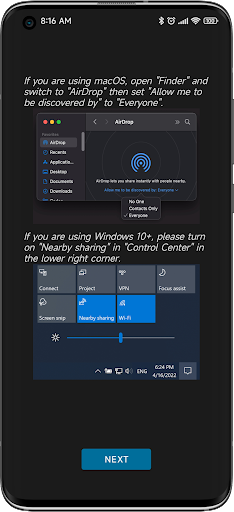
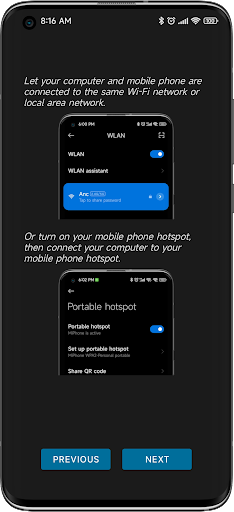
It really works. Shows up as a native airdrop on the Mac without any installation on Mac required. Only caveat is that the Mac must have airdrop set to 'receive from anyone' and must be on the same WiFi network as the phone (you can apparently get around this through connecting Mac to the phone's mobile hotspot but I'm yet to test this). Thank you so much to the devs this is really convenient.
Didn't even work just kept telling me to set it up properly even after I did everything it told me to, couldn't even find any devices at all
It would be great if you could also RECEIVE a file! But this app to SEND file is fantastic...
works well with my Macbook
not working in Monterey
Can we use with AirDrop on iPhone or iPad?
Post a comment
To leave a comment, log in with your social network:
Or leave an anonymous comment. Your comment will be sent for moderation.
Post a comment
To leave a comment, log in with your social network:
Or leave an anonymous comment. Your comment will be sent for moderation.