



Added: Denis Rubinov
Version: 1.0.264
Size: 64 MB
Updated: 04.01.2023
Developer: A-One Scanner
Age Limitations: Everyone
Downloaded on Google Play: 870957
Category: Tools
Description
Application Sign Doc - Sign and Fill PDF was checked by VirusTotal antivirus. As a result of the scan, no file infections were detected by all the latest signatures.
How to install Sign Doc - Sign and Fill PDF
- Download APK file apps from apkshki.com.
- Locate the downloaded file. You can find it in the system tray or in the 'Download' folder using any file manager.
- If the file downloaded in .bin extension (WebView bug on Android 11), rename it to .apk using any file manager or try downloading the file with another browser like Chrome.
- Start the installation. Click on the downloaded file to start the installation
- Allow installation from unknown sources. If you are installing for the first time Sign Doc - Sign and Fill PDF not from Google Play, go to your device's security settings and allow installation from unknown sources.
- Bypass Google Play protection. If Google Play protection blocks installation of the file, tap 'More Info' → 'Install anyway' → 'OK' to continue..
- Complete the installation: Follow the installer's instructions to complete the installation process.
How to update Sign Doc - Sign and Fill PDF
- Download the new version apps from apkshki.com.
- Locate the downloaded file and click on it to start the installation.
- Install over the old version. There is no need to uninstall the previous version.
- Avoid signature conflicts. If the previous version was not downloaded from apkshki.com, the message 'Application not installed' may appear. In this case uninstall the old version and install the new one.
- Restart annex Sign Doc - Sign and Fill PDF after the update.






Requesting an application update
Added Denis Rubinov
Version: 1.0.264
Size: 64 MB
Updated: 04.01.2023
Developer: A-One Scanner
Age Limitations: Everyone
Downloaded on Google Play: 870957
Category: Tools













Reviews for Sign Doc - Sign and Fill PDF
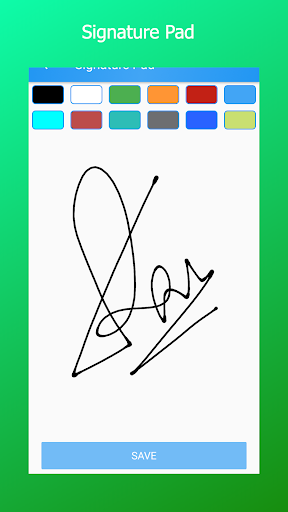
Unfortunately does only let you create some signature can which cannot be used later on on other documents except if you have them already in your phone and you can upload them. The app it's also not working offline so only if you have premium for which I suppose you have to pay. It saves all the files but with zero bytes output meaning to say that actually they can't be used. Also the files are saved with a jpg extension not PNG so you cannot use them for signing other files.
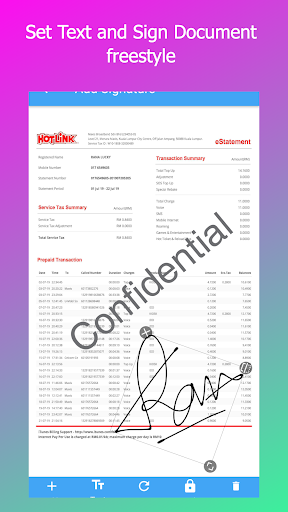
Signing documents was a breeze with this app. Once you learn how to resize your signature, and maneuver it to the correct place. You can also add text for misc items and date the documents. Very happy with this app and how easy it was to learn how to use.
junk, cumbersome, irritating and used unfriendly. update: I compared this app to approximately a dozen others (of the same type). In context... my initial review stands. Moreover, I don't have a problem "figuring out how to use the app" - thus watching a video would be a waste. If i was a developer of apps... I'd make a far better one. I design educational materials, thus, my critique is coming from a POV based on design and used friendly ways to use things like mobile apps.
Clunky app that is difficult to use. When I select a document to sign this app doesn't list as drop down option on my phone. I used the photo option and got really frustrated trying to text in the information. Deleted. I wish Write on PDF was compatible with my phone because that app worked well on my previous phone.
I don't usually rate apps but I like this one a lot. I don't have much use for this type of app. Maybe a few times a year. So to have one do what I need for free is great. Lots of adds. Lots and lots but it's free. Don't like adds? Pay for it. For my needs it's perfect and I'll put up with the adds.
My filled details could not appear in the document when I use your app to edit for signature, and I can't shared the document as an editable copy for filling after editing my signature! Can you work it out to suit smoothing a work flow proccess, this could be much more user friendly!!!
Great app, does exactly what it's intended for. The only reason I didn't give five stars is because when signing a document you have to scale your signature down to fit in the signature space, rather than blow the page up to make it fit easily. I can deal still being young but this prevents my father from being able to use the same app. Maybe the developers could fix this for future updates, maybe I'm missing how to zoom in on the page to make this easier.
I love this app! The main point is we can edit both images as well as pdf. Little improvements needed in UI (like copy-paste, etc) as at present it takes more time if you want to edit more documents! Otherwise great app!
Overall does the job, but controls are clunky (or I am dumb). e.g. I found no way to control text wrapping, and had to place each word individually. Also zooming the document during text placement does not zoom proportionally the text, which it should do IMO.
Post a comment
To leave a comment, log in with your social network:
Or leave an anonymous comment. Your comment will be sent for moderation.
Post a comment
To leave a comment, log in with your social network:
Or leave an anonymous comment. Your comment will be sent for moderation.